
Table of Contents
Hardly any stockout is truly a surprise. The numbers were always there: current stock, sales velocity, supplier lead time. Only nobody added them up, because working through each product in Excel is tedious and gets lost in the day-to-day. That is exactly the calculation the coverage-and-reorder report from byrdAI takes off your hands, for every single SKU, every day anew if you want.
The problem: you only order once it already hurts
Three patterns we see again and again at growing merchants:
Ordering by gut feeling.
A glance at the warehouse replaces the calculation. That works fine until a product turns faster than expected, and then two weeks of revenue are missing because the supplier simply needs 30 days.
The lead time is missing from the calculation.
Many merchants look at the stock ("still 200 units, that's fine"), not at the last possible order day. What matters is not how long your stock lasts, but how long it lasts minus the lead time.
Every SKU gets treated the same.
Your bestseller needs different attention from a slow mover. Without prioritisation, the critical reorder gets lost in a list of hundreds or even thousands of products.
The metrics the reorder report calculates for you
byrdAI pulls your live data from byrd (stock, sales, velocity) and calculates per SKU:
- Coverage (days of cover): how many days your available stock will last at the current sell-through.
- Order day: coverage minus your supplier's lead time. If the value is negative, you are already overdue.
- Recommended order quantity: what you should order to cover the lead time plus target coverage, without buying yourself into overstock.
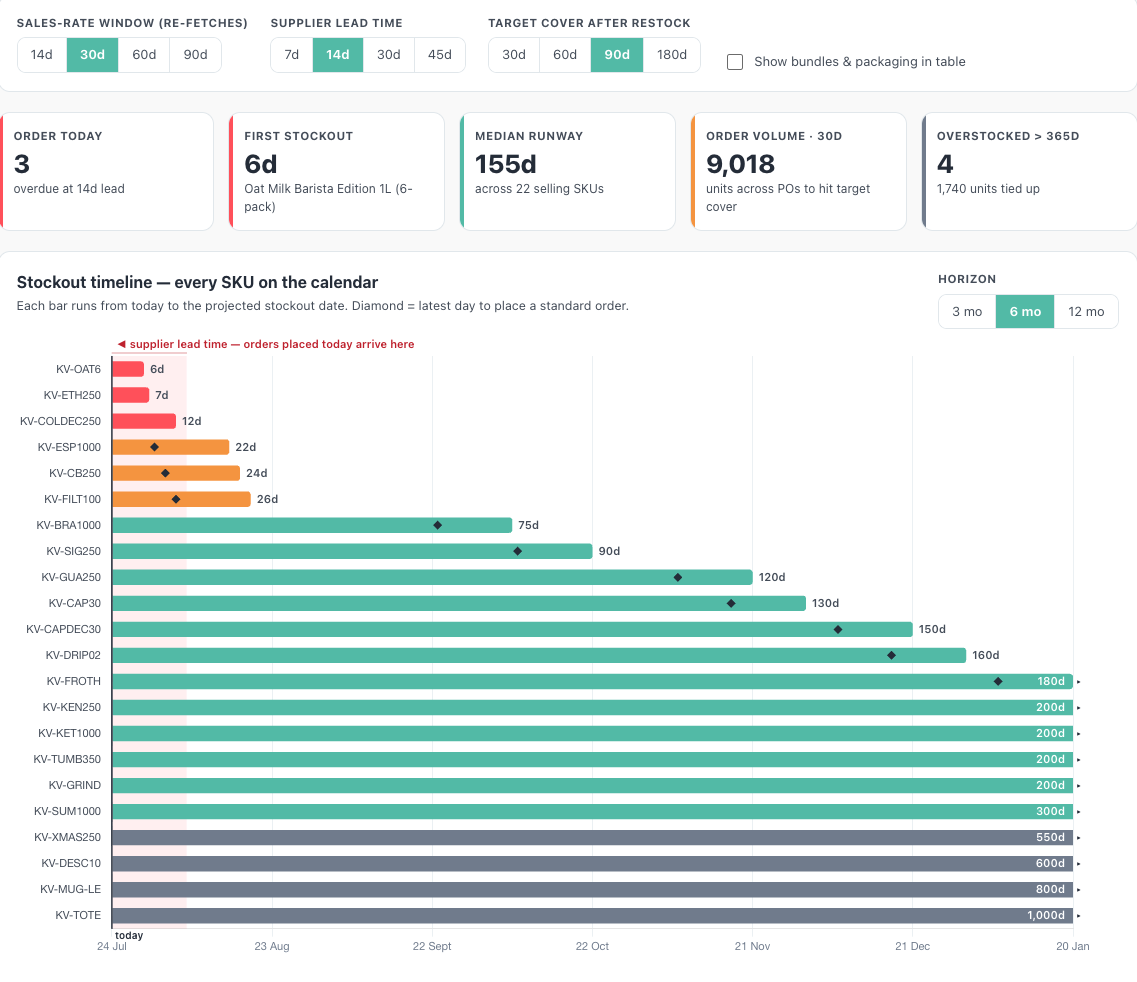
An example: 29 units in stock, on average 6 sales a day, gives just under 5 days of coverage. On a 14-day lead time, this SKU is not "due soon", it is over a week overdue. It is exactly these cases that the report flags red, before they become a revenue problem.
How to build a reorder report with byrdAI
Once connected, this is all it takes in Claude or ChatGPT:
"Which SKUs have less than 14 days of coverage?"
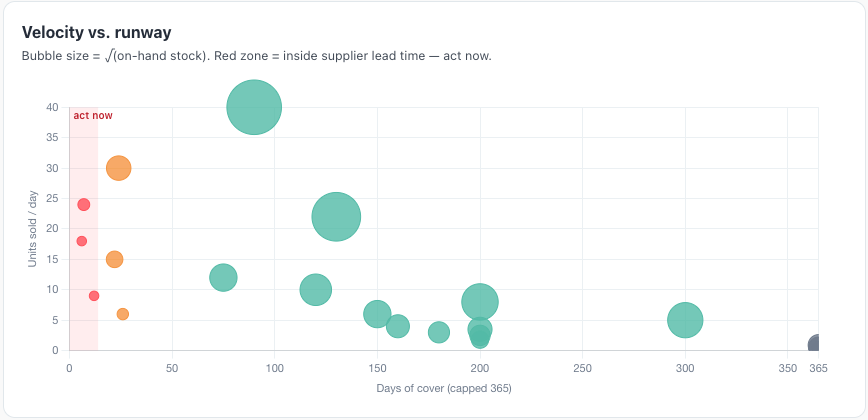
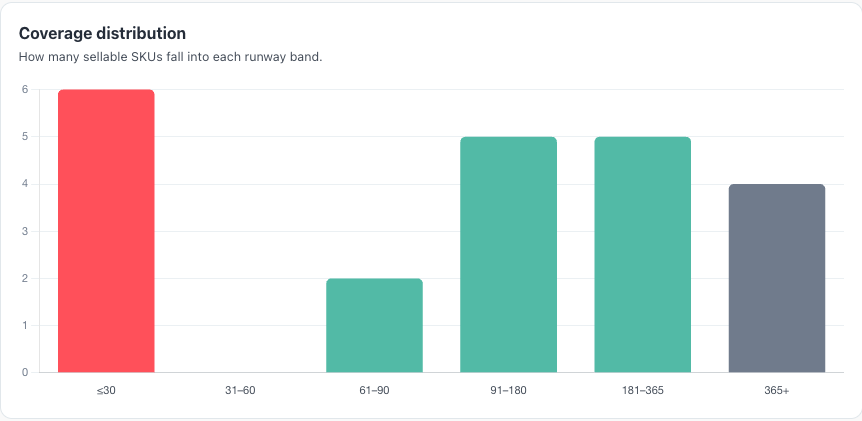
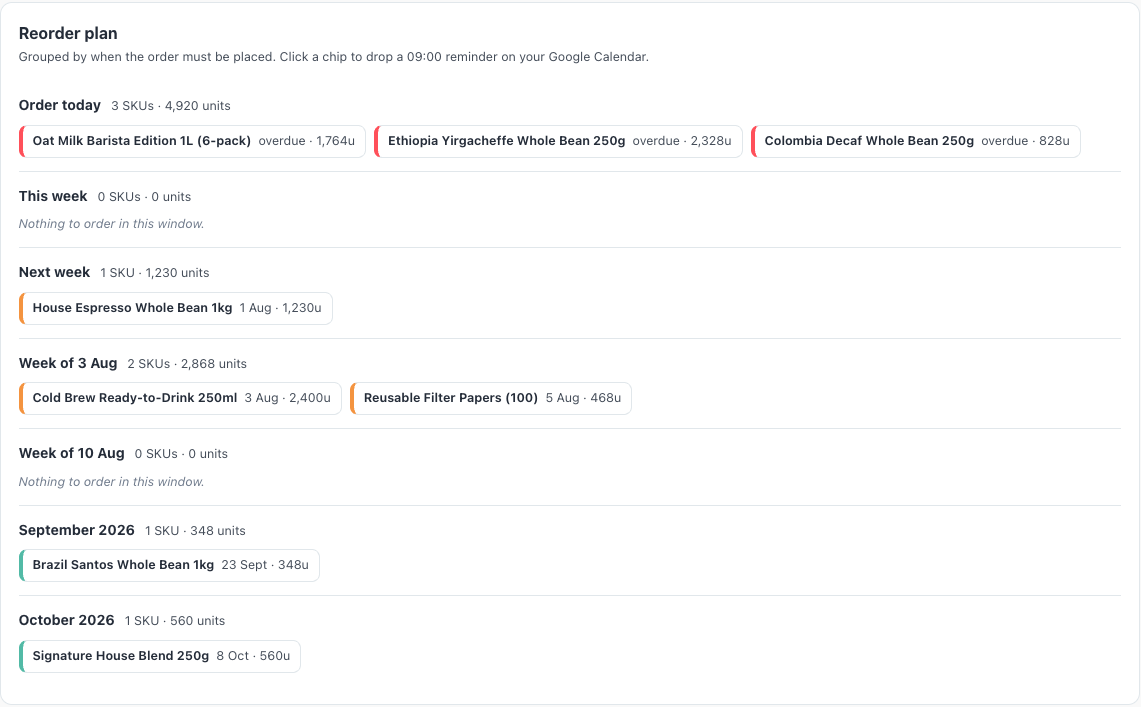
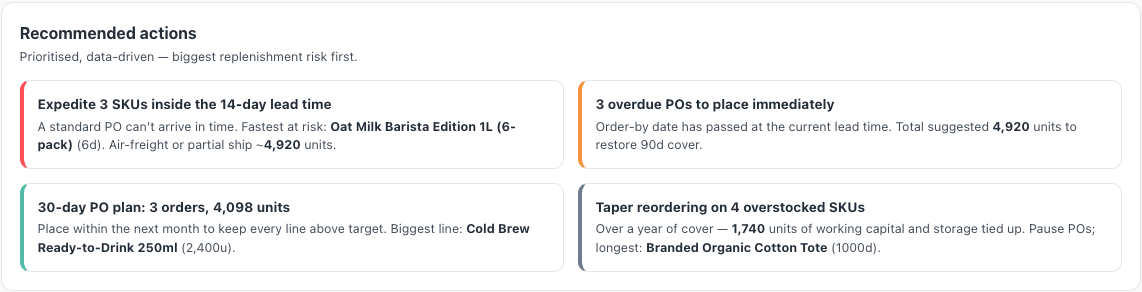
For the full overview, the byrdAI page and the section below have the ready-made dashboard prompt to copy. Claude builds you a live dashboard with a stockout timeline: every SKU as a bar on the calendar, the lead time as a hatched zone, the last order day as a marker. Plus lead time and target coverage as adjustable sliders and a ready-made order plan, bucketed into "Order today", "This week", "Next week". You can, of course, adjust all of this however you like.
Which decisions to draw from it
Overdue SKUs first.
Anything inside the lead time can no longer be saved by a standard order. Here only express shipping, an alternative supplier or an honest "sold out" notice in the shop helps.
The order plan replaces gut feeling.
Instead of checking all products daily, you work through a short, prioritised list: which SKUs, by when, in what quantity.
Avoid overstock.
The report also shows the other side: SKUs with more than a year of coverage. There you pause reordering and put the capital to better use.
From report to routine: reordering on autopilot
The daily order list.
"Every working day at 8am, send me the list of all SKUs I need to reorder, with recommended quantity." Your purchasing starts the day with a ready-made priority list, by email or in Slack.
The early-warning trigger.
"When a SKU drops below 14 days of coverage, draft the order email to my supplier." All you do is approve. If you like, you let recurring orders go out fully automatically.
Order days in the calendar.
Claude can place each order day straight into your Google Calendar as an appointment, including SKU, quantity and byrd link in the description. The last possible order day is then where you are guaranteed to see it.
Seasonal adjustment.
Before the peak you simply ask: "Assume 50% higher sales velocity. What do I need to order, and by when?" No new tool, no new spreadsheet, the same data.
Never surprised by an empty shelf again
As a byrd customer, you connect byrdAI to Claude or ChatGPT in around 5 minutes and copy the reorder prompt from our byrdAI page or below this section. Not a byrd customer yet? byrdAI comes only with byrd fulfilment, as the first European 3PL with an MCP server. Talk to us.
Example prompt for the reorder report (adjust it however you like).
Frequently asked questions about the reorder report with byrdAI
What exactly does days of cover mean?
The number of days your available stock will last at the current sales pace. byrdAI calculates the pace from your real dispatch data of the last 14 to 90 days; you choose the period.
Does the report take my lead times into account?
Yes. You specify your supplier's lead time (say 7, 14, 30 or 45 days) and the report calculates the last sensible order day per SKU from it.
What about bundles?
Bundles are picked from components at byrd. The report therefore focuses on the sellable individual SKUs whose stock can actually run low.
What does byrdAI cost?
During the beta, byrdAI is included free in your account for byrd customers.